



1099 Contractor Pay Stubs

Professional Pay Stubs for Independent Contractors and 1099 Workers. Automatic Tax Calculations, Instant PDF Download. Document your contractor income with professional pay stubs accepted everywhere.

Signing a paystub
money back guarantee
100% Security
Satisfaction Guaranteed
Gold stars

Great Service

First time creating a stub. Customer support was AMAZING. I had a few self-induced issues and customer support was there from start to end.

Brandon Wilson

Why 1099 Contractors Need Pay Stubs

As an independent contractor, no employer generates pay stubs for you. Clients pay you directly, often with no documentation beyond a bank transfer or check. But when you apply for an apartment, a car loan, or a mortgage, the first thing they ask for is proof of income. A professional pay stub is the fastest way to provide it.

A 1099 contractor pay stub documents exactly what you earned, what taxes apply, and what your net income looks like. It puts your contractor income into the same format that banks, landlords, and lenders see from traditional employees. Instead of explaining your income situation with bank statements and tax returns, you hand over a clean pay stub that answers their questions immediately.

ThePayStubs generator creates contractor pay stubs in under 2 minutes. Enter your income details, the calculator applies federal and state taxes plus self-employment tax, and your finished PDF is ready to download.

Built for Independent Contractors

Traditional pay stub generators assume you have a single employer and a fixed salary. That does not describe most 1099 contractors. ThePayStubs handles the realities of contractor work:

  • Variable income. Your earnings change month to month. Generate stubs that reflect what you actually made each period.
  • Multiple clients. Combine income from different clients into one stub or create separate stubs per client.
  • Self-employment tax. Independent contractors owe both the employee and employer portions of FICA. The calculator accounts for the full 15.3% (12.4% Social Security plus 2.9% Medicare).
  • No employer on file. Your stub shows your business name or "Independent Contractor" in the employer field.
How to Create a 1099 Contractor Pay Stub in 3 Steps

how to create a pay stub step 1

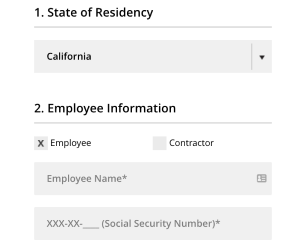
1. Enter Information such as company name, your work schedule and salary details

how to create a pay stub step 2

2. Choose your preferred theme and preview your pay stub.

how to create a pay stub step 3

3. Download and print your stub instantly

1099 Contractor Pay Stub Features

Self-Employment Tax Calculations

The generator calculates both the employee and employer portions of Social Security and Medicare automatically. The total self-employment tax rate of 15.3% is reflected in your withholdings, keeping your stub aligned with what you will owe at tax time. Federal and state income taxes are also computed based on your filing status.

Flexible Employer Field

Enter your business name, LLC name, DBA, or simply "Independent Contractor" in the employer field. The stub adapts to however you identify your contracting work, so the document makes sense for your specific situation.
Professional Payroll Format

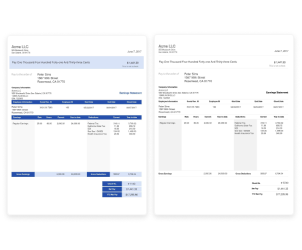
Every stub follows standard payroll formatting with clearly labeled sections for gross income, itemized deductions, and net pay. The layout matches what W-2 employees receive from corporate payroll departments, so the document is immediately familiar to anyone reviewing it.

Instant PDF Download

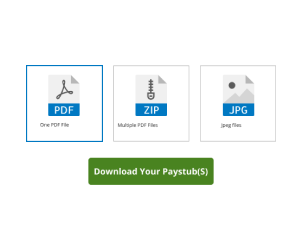
Your completed pay stub is available as a PDF the moment you finish. Download it, print it, email it to a lender, or upload it to an application portal. No waiting, no processing, no account required.

Year-to-Date Totals

Each stub calculates running YTD totals for gross income, all tax categories, and net pay. When a lender asks for year-to-date earnings, the figure is right on the document. Generate stubs for multiple periods and the YTD numbers carry forward automatically.


Frequently Asked Questions

Do 1099 contractors need pay stubs?

1099 contractors are not legally required to receive pay stubs from clients, but creating your own pay stubs is the most practical way to document income. Banks, landlords, and lenders regularly ask for pay stubs as proof of income, and having them ready saves time during applications.

How is a 1099 contractor pay stub different from a W-2 employee pay stub?

The format is the same. The difference is in the details. A contractor pay stub shows your business name instead of an employer, and the tax calculations reflect self-employment tax obligations. Independent contractors pay both the employee and employer portions of Social Security and Medicare, totaling 15.3%.

What information do I need to create a 1099 pay stub?

You need your full name, business name or "Independent Contractor," your business address, the pay period dates, gross income for that period, and your filing status. The generator handles all tax calculations including federal income tax, state tax, Social Security, and Medicare.

Will banks accept 1099 contractor pay stubs?

Pay stubs from ThePayStubs follow standard payroll formatting and include all fields that banks and lenders review. These include business information, pay period, gross income, itemized deductions, and net pay. The amounts on your stub must accurately reflect your real earnings.

Can I create pay stubs for income from multiple clients?

Yes. You can create a single pay stub per period that combines income from all clients, or separate stubs for each client. For loan and apartment applications, a consolidated stub showing total income per period is usually the clearest approach.

How do taxes work on a 1099 contractor pay stub?

The generator calculates federal income tax based on your filing status and income, plus state income tax for your state. For Social Security and Medicare, independent contractors owe both the employee and employer portions. The total self-employment tax rate is 15.3% (12.4% Social Security plus 2.9% Medicare).

Professional Pay Stubs for Contractors

No subscriptions. No payroll software. Enter your contractor income details, let the calculator handle the taxes, and download a professional 1099 contractor pay stub in minutes.


money back guarantee
100% Security
Satisfaction Guaranteed
Gold stars

Great Service

First time creating a stub. Customer support was AMAZING. I had a few self-induced issues and customer support was there from start to end.

Brandon Wilson

Need Help? Chat with us and we'll help you fill the form.

Brett Hello! Don't hesitate to reach out if you have any questions. I'm just a message away!

We respond immediately

Welcome to our chat support! Glad to have you. Please fill out the form for personalized assistance, and we'll be with you right away.
Start the chat
