Payroll Reports: Types, Examples, and How to Create One (2026)
 By
A lender wants proof of your income. The IRS wants your quarterly numbers. Your accountant wants to know why labor costs jumped in March. Each answer lives in your payroll reports. These records turn every paycheck into totals you can file, check, and share. Each one starts with clean pay data, and our pay stub templates show what that looks like. This guide covers the main report types, the federal forms built from them, and a five-step way to make your own. You'll also see a real sample with numbers that add up. Small business owners get a clear filing calendar. Workers get tips on using payroll records as proof of income.
Key Takeaways
- A payroll report totals gross pay, deductions, taxes, and net pay for a set period.
- Employers use them to file Forms 941, 940, W-2, and W-3 on time.
- The IRS says to keep employment tax records for at least 4 years.
- Workers can use the same data to prove income to landlords and lenders.
- What Is a Payroll Report?
- Why Do Payroll Reports Matter?
- Types of Payroll Reports
- Federal Payroll Reports Employers File in 2026
- How to Create Payroll Reports in 5 Steps
- Sample Payroll Report: What One Looks Like
- Payroll Reporting Compliance: Records and Mistakes
- Payroll Reports for Employees and the Self-Employed
What Is a Payroll Report?
A payroll report is a record that totals what a business paid its employees for a set period. It lists gross pay, tax withholdings, other deductions, and net pay. It also shows the taxes the employer owes. Businesses use payroll reports to file taxes, track labor costs, and prove pay to auditors.
Most of them pull from the same payroll data. A typical one shows:
- Pay period: The start and end dates the report covers.
- Hours worked: Regular hours, overtime, and paid time off.
- Gross pay: Total earnings before anything comes out.
- Deductions: Federal tax, state tax, Social Security, Medicare, and benefits.
- Net pay: What lands in each worker's bank account.
- Employer taxes: The company's share of FICA and unemployment tax.
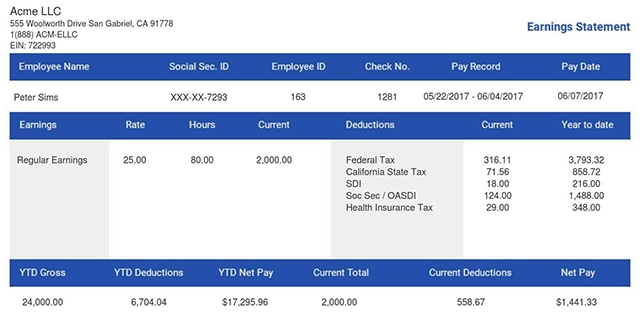
Payroll reporting is the habit of pulling these numbers on a set schedule. It isn't the same as a pay stub. A stub goes to one worker for one check, and you can see what a pay stub looks like in our guide. A report rolls up the whole team, or one worker over time, for the people who run the business.
Why Do Payroll Reports Matter?

Payroll reports matter because they feed the tax forms a business must file and the records it must keep. They show where labor money goes each pay period. For workers, the same data backs up the pay stubs and income letters that landlords and lenders ask to see.
For business owners, the payoff is clear. Labor is often the biggest cost a small company has. A good report shows it by person, by team, and by week. That makes budgets easier to set and mistakes easier to catch before they reach a tax return.
Reports also protect you in an audit. If the IRS or a state agency questions a number, you can show the math.
Employees benefit too. A clean payroll history makes it simple to request income proof for an apartment, a car loan, or a mortgage. Here's how lenders use pay stubs for loan applications.
Types of Payroll Reports
Most small businesses run eight kinds of reports. Some are for your own planning. Others feed the forms you send to the government.
Summary Report
Owners check this one right after a pay run. It's a one-page view of the whole run: total gross pay, total taxes withheld, total deductions, and total net pay. So, what is a payroll summary report really for? It answers one question fast: how much did this payroll cost?
Payroll Register Report
The register is the detailed version. It lists every worker on its own line, with hours, rate, gross pay, each deduction, and net pay. Accountants use it to trace any total back to a single paycheck.
Employee Payroll Report
This report covers one person over a set time, such as a quarter or a year. It shows year-to-date earnings, taxes, and benefit deductions. HR uses it for raises and reviews. Workers often ask for one when they need income proof.
Payroll Tax Liability Report
This report shows how much tax you withheld, how much you've paid, and how much you still owe. It tracks Social Security and Medicare (FICA). Social Security in 2026 applies to the first $184,500 of each worker's wages. It also tracks Medicare, which has no wage cap.
Payroll Reconciliation Report
This report checks that your numbers match. It compares the register to your bank debits and your tax deposits. If the totals don't line up, you fix it before you file.
Time Tracking and PTO Reports
These reports show hours worked, overtime, and paid time off used or saved. They help you spot overtime creep and plan coverage for busy weeks.
Certified Payroll Report
This report is required on federal construction jobs covered by the Davis-Bacon Act. Contractors send one each week to prove they paid the local prevailing wage. Most use the Department of Labor's Form WH-347.
Payroll Analysis Report
This report looks for trends. It compares labor costs by month, team, or location. It answers questions like "Did overtime rise after we added Sunday hours?"
Federal Payroll Reports Employers File in 2026

Payroll reporting requirements come from federal, state, and sometimes local agencies. At the federal level, most employers file the forms below. Each one is built from the internal reports above.
| Form | What It Reports | How Often | Due Date |
|---|---|---|---|
| Form 941 | Federal income tax withheld, plus Social Security and Medicare | Quarterly | April 30, July 31, Oct. 31, Jan. 31 |
| Form 940 | Federal unemployment tax (FUTA): 6% on the first $7,000 per worker | Yearly | Jan. 31 |
| Form 944 | Replaces Form 941 for very small employers the IRS notifies | Yearly | Jan. 31 |
| Forms W-2 and W-3 | Each worker's wages and taxes, plus the totals sent to the SSA | Yearly | Jan. 31 |
| Form 1099-NEC | Contractor payments of $2,000 or more made in 2026 | Yearly | Jan. 31 |
Your quarterly payroll reports feed Form 941. The four 941 totals should match your year-end numbers. That's why the 941 payroll report is the one to double-check most often.
The 940 payroll report covers FUTA tax. It usually comes to 0.6% after the state credit, or $42 per worker. Yearly totals also produce each W-2. If you issue those forms yourself, you can make them with our W-2 form generator.
States add their own rules. Most require quarterly unemployment wage reports, and many require state income tax returns too.
How to Create Payroll Reports in 5 Steps
Most payroll software builds reports as part of payroll processing. You can also make them in a spreadsheet. Either way, the steps are the same.
- Pick the time period. Choose a pay period, a month, a quarter, or a year. A monthly payroll report is a good habit for most small teams.
- List the fields you need. Start from a payroll report template with columns for name, hours, rate, gross pay, each tax, other deductions, and net pay.
- Enter or pull the data. Use time sheets and pay records for each worker. Software can pull this from your time tracking tool.
- Reconcile before you trust it. Match total net pay to your bank debits. Match taxes withheld to your tax deposits. Fix any gaps now.
- Save and share. Export a PDF with a clear file name, such as "2026-03-payroll-summary.pdf." Send it to your accountant and store a copy.
Running the same steps every pay period keeps small errors from piling up. It also turns year end payroll reports into a quick check instead of a scramble.
Sample Payroll Report: What One Looks Like
Here's one for a small cafe with three workers on a biweekly schedule. Federal income tax amounts are examples only; real withholding depends on each W-4.
| Employee | Gross Pay | Social Security (6.2%) | Medicare (1.45%) | Federal Income Tax | Net Pay |
|---|---|---|---|---|---|
| Ana | $1,800.00 | $111.60 | $26.10 | $150.00 | $1,512.30 |
| Ben | $1,400.00 | $86.80 | $20.30 | $95.00 | $1,197.90 |
| Cara | $1,000.00 | $62.00 | $14.50 | $40.00 | $883.50 |
| Total | $4,200.00 | $260.40 | $60.90 | $285.00 | $3,593.70 |
The owner also owes a matching $321.30 in Social Security and Medicare. FUTA adds $25.20 at the 0.6% rate.
Payroll Reporting Compliance: Records and Mistakes
Good compliance starts with keeping records long enough. The IRS recordkeeping rules say to keep employment tax records for at least 4 years. Federal wage law asks for 3 years of payroll records and 2 years of time cards. Some states ask for more, so follow the longest rule that applies to you.
These are the mistakes that cause the most trouble:
- Wrong worker type. Treating an employee as a contractor skips taxes you owe. Learn the 1099 vs. W-2 difference.
- Missed thresholds. The 1099-NEC limit rose to $2,000 for 2026 payments.
- No reconciliation. Filing a 941 that doesn't match your W-2 totals invites IRS letters.
- Late deposits. Penalties can start the day after a deposit is due.
- Lost backups. Store reports in two places, such as cloud storage and a local drive.
Payroll Reports for Employees and the Self-Employed
These records aren't just for HR. If you're an employee, you can ask HR for a year-to-date pay summary. It's strong proof of income for a lease or a loan.
If you're self-employed, you probably don't run payroll for yourself. But lenders still want steady proof of what you earn. Keep a simple monthly record of your income and taxes, or create a self-employed pay stub each month. It helps at tax time and when you apply for credit. S-corp owners who pay themselves a salary run real payroll and file the same forms as any employer.
You Might Also Like
- Payroll Codes
- Pay Period Breakdown
- Pay Stub Record Keeping
- How to Read a W-2 Like a Pro
- Payroll Management Tools
Conclusion
Payroll reports turn each paycheck into numbers you can file, check, and prove. Run a summary and a register every pay period, reconcile before you file, and keep records for at least four years. Workers can lean on the same records when they need income proof. Need clean pay records for yourself or your team? Use our paystub generator to create accurate pay stubs in minutes.
- 1. Enter Your Information

- 2. Select Your Favorite Theme

- 3. Download Your Stub!

 By